

Aim for 1,000 to 2,500 joules for most home electronics; higher for whole-house systems.
I’ve spent years selecting and testing surge protection for home and office gear, and I’ll walk you through exactly how many joules for surge protector needs make sense. This guide covers what joules measure, how many joules for surge protector you should buy for phones, TVs, PCs, and whole-house panels, and real-world tips from my own experience to help you choose confidently.
Understanding joules and surge protection
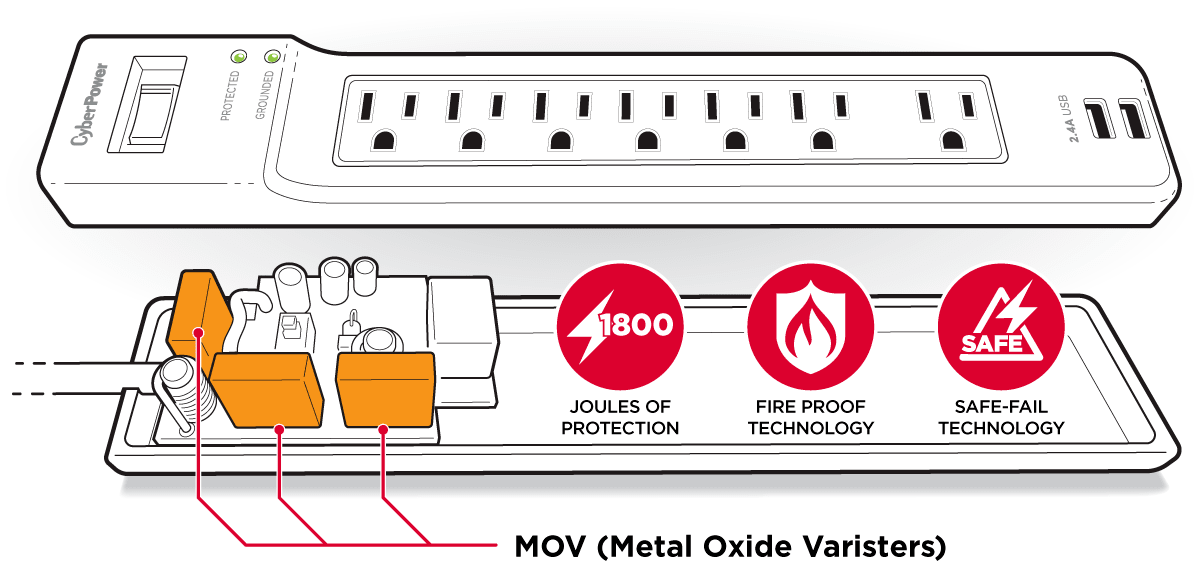
Joules measure energy. For surge protectors, a joule rating tells you how much surge energy a device can absorb before it wears out. The higher the joules, the more energy the protector can take. But joules are only one part of the story. Clamping voltage, response time, and quality components matter too.
Why the joule number alone can be misleading:
- A high joule rating with poor clamping still lets damaging voltage through.
- Some protectors advertise cumulative joules; that doesn’t always equate to real-world protection.
- Surge duration and shape affect damage risk even if joule ratings seem adequate.
When asking how many joules for surge protector, think of joules as a capacity gauge. Match that capacity to your gear and local risk.
Recommended joules by device and use case
Different devices need different protection levels. Below are practical ranges for typical home and office gear when considering how many joules for surge protector:
- Smartphones, lamps, small chargers: 200 to 600 joules.
- TVs, soundbars, streaming devices: 600 to 1,000 joules.
- Desktop PCs, gaming consoles, monitors: 1,000 to 2,000 joules.
- Home office with multiple devices or a NAS: 1,500 to 3,000 joules.
- Whole-house surge protectors at the service panel: 10,000 joules or more per phase, depending on panel and local conditions.
Guidelines:
- For a single power strip protecting a TV or PC, aim for at least 1,000 joules.
- For expensive gear or mixed setups, choose 2,000+ joules.
- Use a whole-house protector at the panel for mains-level lightning or major grid events, then protect sensitive gear locally.
These recommendations help answer how many joules for surge protector needs across typical scenarios. Higher-value equipment deserves higher joule protection.
Factors that affect how many joules you need
Your choice of how many joules for surge protector depends on several factors beyond device cost.
- Local lightning frequency and grid stability – More lightning = higher joules recommended.
- Equipment value – Replace costlier gear with higher-rated protection.
- Number of connected devices – Multiple devices increase cumulative risk.
- Existing whole-house protection – If you have panel protection, lower joule local strips can be fine.
- Warranty and insurance – Some warranties require specific ratings.
- Clamping voltage and response time – Lower clamping voltage + fast response often matters more than raw joules.
Consider these factors together when deciding how many joules for surge protector to buy. Don’t pick a number in isolation.
How to choose the right surge protector: step-by-step
Here’s a simple process to decide how many joules for surge protector purchases.
- Inventory your gear and its value. High-value items need more protection.
- Check local risk. If your area has frequent storms, increase joules.
- Look for UL 1449 or equivalent testing and a clear joule rating.
- Prioritize clamping voltage under 400V for 120V systems.
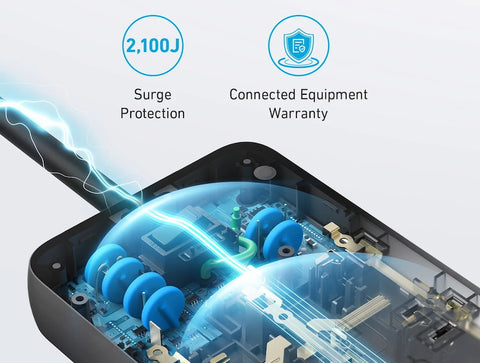
- Prefer units with indicator lights, warranties, and equipment guarantees.
- Combine whole-house protection with point-of-use devices for best results.
Following these steps makes the decision about how many joules for surge protector practical and defensible. You’ll protect equipment better and avoid overspending.

Installation, maintenance, and replacement tips
Once you buy the right joules, proper installation and upkeep are key.
- Plug sensitive gear into surge protectors with the right joule rating.
- For whole-house units, use a qualified electrician for panel installation.
- Replace strips after a large surge or if the indicator light goes out.
- Note that surge protectors wear down slowly; low-cost units may fail silently.
- Keep receipts and register warranties; many manufacturers offer equipment protection.
These tips help ensure the joule rating you chose actually delivers long-term safety. Remember that knowing how many joules for surge protector is only useful with proper use and monitoring.
My experience and practical lessons
I once replaced a cheap 400-joule strip after a nearby transformer surge. The strip’s light still glowed, but my external hard drive failed later. I upgraded to a 2,400-joule protector for my desktop and a whole-house unit at the meter. Since then, I’ve avoided costly replacements.
Lessons I learned:
- Always prioritize clamping voltage and warranty over marketing language.
- Spend more on protection for backup drives and workstations.
- Replace protection after a strong surge, even if the unit looks fine.
These real-world steps will help you pick how many joules for surge protector to trust with your devices.

Common misconceptions about joules and protection
Addressing myths helps you choose better protection.
- Myth: More joules always equal better protection. Reality: Clamping voltage and build quality matter too.
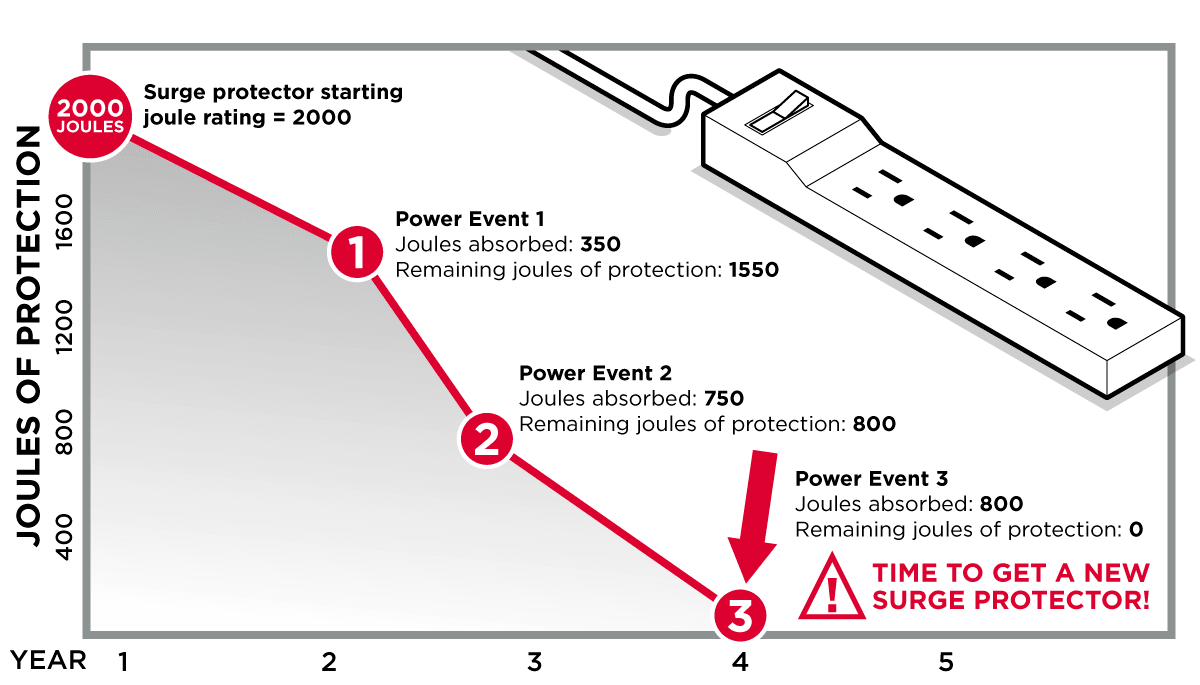
- Myth: A one-time big joule rating protects forever. Reality: Joules are depleted over repeated surges.
- Myth: All surge protectors are the same. Reality: Components, warranty, and testing differ widely.
- Myth: Cheap strips save money. Reality: They often fail silently and risk expensive gear.
Clear understanding of these myths helps you determine how many joules for surge protector makes sense for you.
Frequently Asked Questions of how many joules for surge protector
What does the joule rating on a surge protector mean?
The joule rating measures how much energy the protector can absorb before it fails. It gives a rough idea of lifetime capacity and how many or how large surges it can handle.
Is a higher joule rating always better for my devices?
Not always. Higher joules help with big or repeated surges, but clamping voltage and response time are equally important for stopping damage. Balance joules with other specs.
How many joules for surge protector should I use for a gaming PC?
Aim for 1,000 to 2,000 joules for a gaming PC, and consider a UPS for battery backup plus surge suppression. High-end rigs or multiple monitors may need 2,000+ joules.
Do whole-house surge protectors replace the need for point-of-use protectors?
Whole-house units reduce large incoming surges but do not protect against all transient events. Point-of-use protectors add a second layer, so use both for best defense.
How often should I replace a surge protector based on joules?
Replace after a large surge event or every few years if you can’t verify its protection status. Some units include indicators or warranties that inform replacement timing.
Conclusion
Choosing how many joules for surge protector comes down to matching risk, device value, and product quality. Prioritize 1,000 to 2,500 joules for most home electronics, use higher ratings for expensive setups, and pair panel protection with point-of-use devices. Test and replace protectors when indicators or events suggest depletion. Start by inventorying your gear, set a protection budget, and upgrade critical items first to protect your investments. Share your setup or questions below, subscribe for updates, or try a higher-rated protector for your most valuable devices.